
Download Windows Fat Drive Recovery Software – Free, Secure Data Recovery for FAT Drives
Overview – Why Windows Fat Drive Recovery Software Matters
In today’s digital workplace, data loss can happen in an instant – a stray click, a corrupted partition, or a sudden power surge can wipe out important files on a FAT‑formatted drive. For Windows users, finding a reliable, easy‑to‑use solution that specifically targets the FAT file system is essential. Windows Fat Drive Recovery Software fills that niche perfectly.
Developed by Drive Recovery Software, this full‑version application belongs to the “Backup & Cloud Storage” category but distinguishes itself by focusing solely on FAT drives, including FAT12, FAT16, and FAT32. The tool offers a clean, intuitive interface that welcomes both novice users and seasoned IT professionals. Whether you accidentally deleted documents, photos, or program files, or you’re dealing with a drive that refuses to mount, the software runs deep scans, reconstructs lost directory structures, and restores data with a high success rate.
Its built‑in preview feature lets you verify recoverable files before committing to the restore, saving both time and storage space. Moreover, the program adheres to strict security standards, ensuring that recovered data remains private and that the software itself is free from hidden malware or adware. In short, Windows Fat Drive Recovery Software provides a secure, efficient, and user‑friendly way to bring back what seemed lost forever, making it an indispensable addition to any Windows PC’s utility toolbox.
Key Features That Set This Tool Apart
Windows Fat Drive Recovery Software packs a robust set of capabilities designed to tackle the most common and complex FAT‑related data loss scenarios. Its scanning engine employs a three‑tiered approach: quick scan for recently deleted files, deep scan for fragmented or partially overwritten data, and a sector‑by‑sector scan for severely corrupted drives. The software’s intelligent file‑type detection recognises over 400 formats, ranging from standard documents (DOCX, PDF) to multimedia (MP4, JPEG) and system files (EXE, DLL).
A standout feature is the Live Preview mode, which renders thumbnails of images, videos, and even office documents, allowing users to confirm file integrity before initiating a full recovery. The built‑in filter system lets you narrow results by file type, size, or modification date, streamlining the recovery process on large drives. For power users, the application supports command‑line operations, enabling automated batch recoveries via scripts.
Additionally, the software includes a disk health monitor that warns of imminent hardware failures, encouraging proactive backups. All these features are delivered through a sleek, Windows‑native UI that follows Microsoft’s Fluent Design guidelines, ensuring a consistent look and feel across Windows 10 and Windows 11.
- Quick Scan, Deep Scan, and Sector‑by‑Sector Scan modes
- Supports FAT12, FAT16, and FAT32 file systems
- Recognition of over 400 file formats
- Live Preview of recoverable files with thumbnails
- Advanced filter options (type, size, date)
- Command‑line interface for automated recovery
- Disk health monitoring and failure alerts
- Secure, ad‑free installation with no hidden components
Installation, Compatibility, and Step‑by‑Step Usage Guide
Installing Windows Fat Drive Recovery Software is straightforward and takes just a few minutes. Begin by downloading the installer from the official Drive Recovery Software website – the link is protected by SSL encryption, guaranteeing a safe transfer. Once the .exe file is saved, double‑click to launch the wizard.
The setup process follows the classic Windows installer flow: accept the End‑User License Agreement, choose an installation folder (the default path works for most users), and optionally create a desktop shortcut. After clicking “Install,” the software copies necessary files and registers a few system services that enable low‑level disk access; this step may require administrator privileges, which the installer requests automatically. When the installation completes, launch the program from the Start menu or desktop shortcut.
Compatibility is broad: the application runs on Windows 7, 8, 8.1, 10, and 11, both 32‑bit and 64‑bit editions. It supports both SATA and USB‑connected external drives, as well as SD cards formatted with FAT. Minimum system requirements are modest – a dual‑core CPU, 2 GB RAM, and 150 MB of free disk space for the program itself. For optimal performance during deep scans, a faster SSD and at least 4 GB of RAM are recommended.
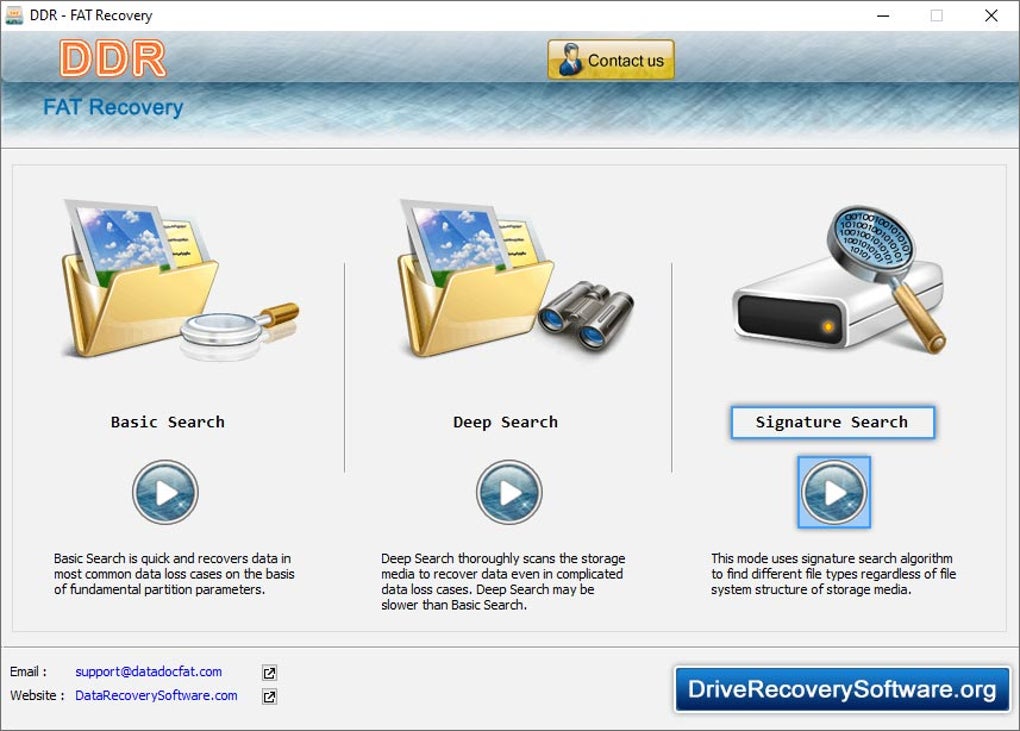
Using the software is intuitive. After launching, you’ll see a clean dashboard with three primary buttons: “Quick Scan,” “Deep Scan,” and “Sector Scan.” Select the drive you wish to recover, then choose the appropriate scan type. For most accidental deletions, a Quick Scan suffices and completes within minutes.
For corrupted partitions, opt for Deep Scan, which may take longer but digs deeper into the drive’s structure. Once the scan finishes, results appear in a sortable list. Use the filter bar to narrow results, then click the eye icon to preview any file.
To recover, select the desired items, choose a safe destination (never the same drive you’re scanning), and click “Recover.” The software writes the files to the chosen location, preserving original timestamps when possible. A progress bar tracks the operation, and a final report summarises the number of files restored, any errors encountered, and suggestions for future backups.
Pros, Cons, and Frequently Asked Questions
Pros
- Specialized focus on FAT file systems delivers higher recovery rates for those drives.
- User‑friendly UI makes the tool accessible to non‑technical users.
- Live preview reduces guesswork and saves storage space.
- Command‑line support enables automation for IT professionals.
- Secure, ad‑free installation with regular free updates.
Cons
- Only supports FAT drives; NTFS or exFAT recovery requires a different product.
- Deep scans can be time‑consuming on very large drives.
- No built‑in cloud backup integration (focuses solely on local recovery).
Frequently Asked Questions
Can I recover files from a partially formatted FAT drive?
Yes. The deep scan mode can locate remnants of files even after a partial format, though success depends on how much of the file system was overwritten.
Is the software safe to use on a drive that still contains important data?
Absolutely. The program only reads the disk; it never writes to the source drive unless you explicitly choose to restore files to that same location, which is not recommended.
Do I need an internet connection for the recovery process?
No. After the initial download and installation, the software works completely offline. An internet connection is only required for checking updates.
What file types can be recovered?
The engine recognizes more than 400 formats, including documents (DOCX, PDF), images (JPEG, PNG, GIF), videos (MP4, AVI), audio (MP3, WAV), archives (ZIP, RAR), and system files (EXE, DLL).
How much does the full version cost?
A single‑user license is priced at $49.99 USD, which includes free updates for one year and priority email support.
Conclusion – Secure Your Data Today
Data loss on FAT drives no longer needs to be a source of panic. With its targeted recovery algorithms, intuitive interface, and comprehensive feature set, Windows Fat Drive Recovery Software delivers a dependable solution for anyone using Windows PCs. Whether you’re a home user who accidentally deleted family photos or an IT specialist tasked with salvaging mission‑critical logs, the program balances power and simplicity in a way few competitors manage. The modest price point, combined with a free trial that lets you preview recoverable files, makes it a low‑risk investment for peace of mind. Don’t wait until another unexpected crash forces you to scramble for a solution—download the software now, run a quick scan, and protect your digital assets before it’s too late.
Click here to purchase and download the full version.







